

The best free Q&A platform just got better - Scoold has a new admin dashboard!
Running a Q&A platform for your team is only half the job. Once people start using it, administrators need to understand what’s happening: Which questions are getting attention? Who are the most active users? Is engagement increasing? Which questions have been sitting unanswered for too long?
That’s why we’re introducing a brand-new admin dashboard for Scoold and Scoold Pro.
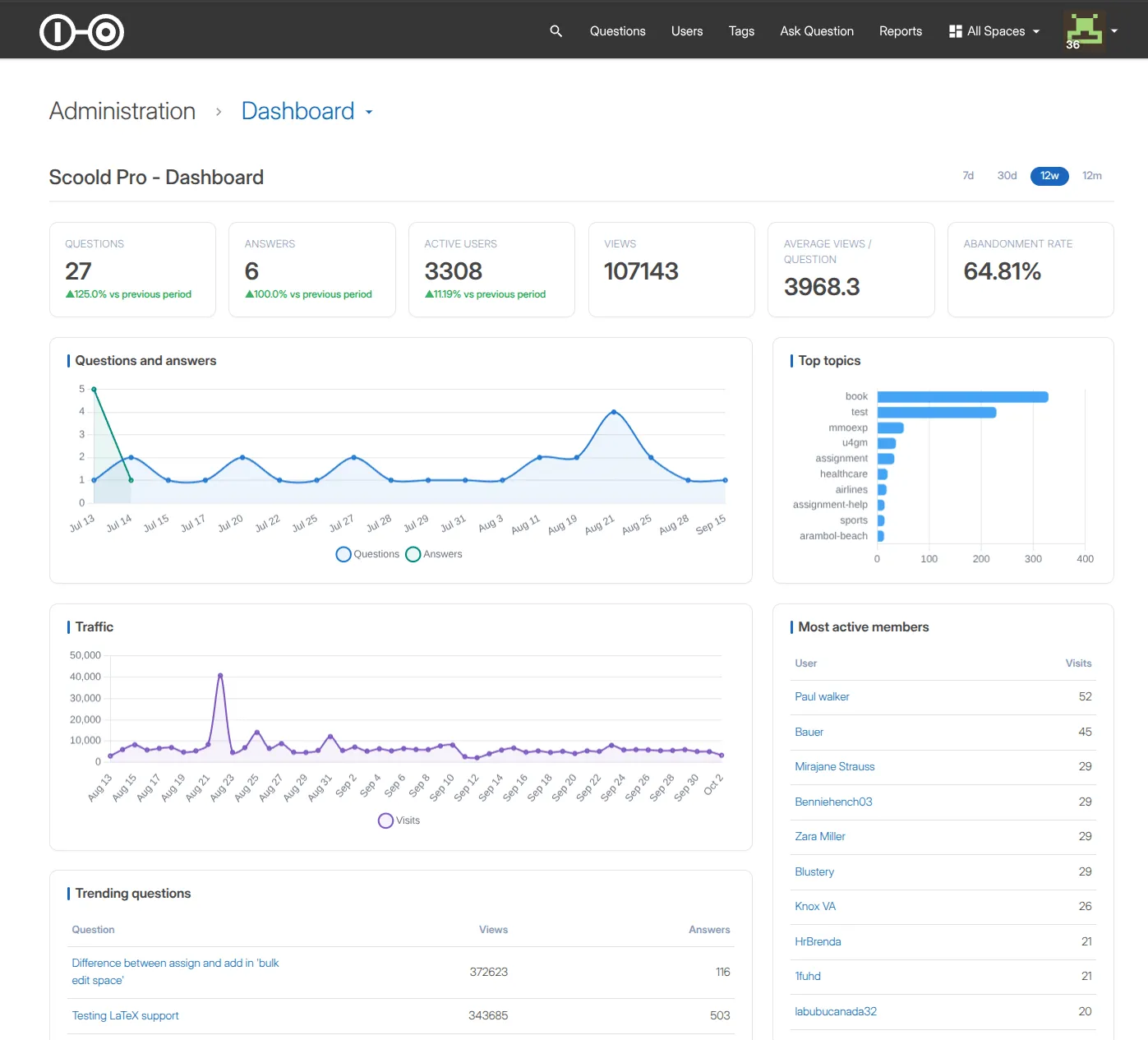
The dashboard gives administrators an at-a-glance view of what’s happening across their Scoold installation, with statistics, activity metrics, charts, trending content, user engagement and more.
And there’s another interesting story behind this release: we built most of it with an AI coding agent.
A dashboard for your Q&A community
The new dashboard is available from the /admin section of Scoold and is designed to give administrators a quick overview of the health and activity of their Q&A community.
Among other things, it provides information about:
- Top users and user engagement
- Trending content
- Questions and answers
- Views and votes
- Reputation points
- Engagement over time
- Basic community statistics
- Recent activity
One of the most useful views for an administrator is identifying questions that have remained unanswered for a long time. These are often the questions that need attention from moderators or subject-matter experts.
The dashboard also makes it easier to spot which parts of your knowledge base are getting the most attention and which users are contributing the most.
Building the dashboard with OpenCode
For this feature, I used OpenCode, an open-source AI coding agent, to do most of the implementation work.
I started by preparing a PRD.md describing the feature and providing screenshots showing the kind of dashboard UI we wanted. I then gave OpenCode a relatively simple initial instruction:
Take a look at the PRD and devise a plan for implementing the new feature. We need a new dashboard at
/admin.
The agent had access to the existing Scoold codebase and the design references.
From there, the work became an iterative collaboration between me and the coding agent. I still inspected the existing code myself and made the important architectural decisions. In particular, I had to explain some of the details of Scoold’s backend architecture and how its underlying Para data model works. The agent handled most of the implementation.
Four days, 56 prompts and 4.5 hours of AI work
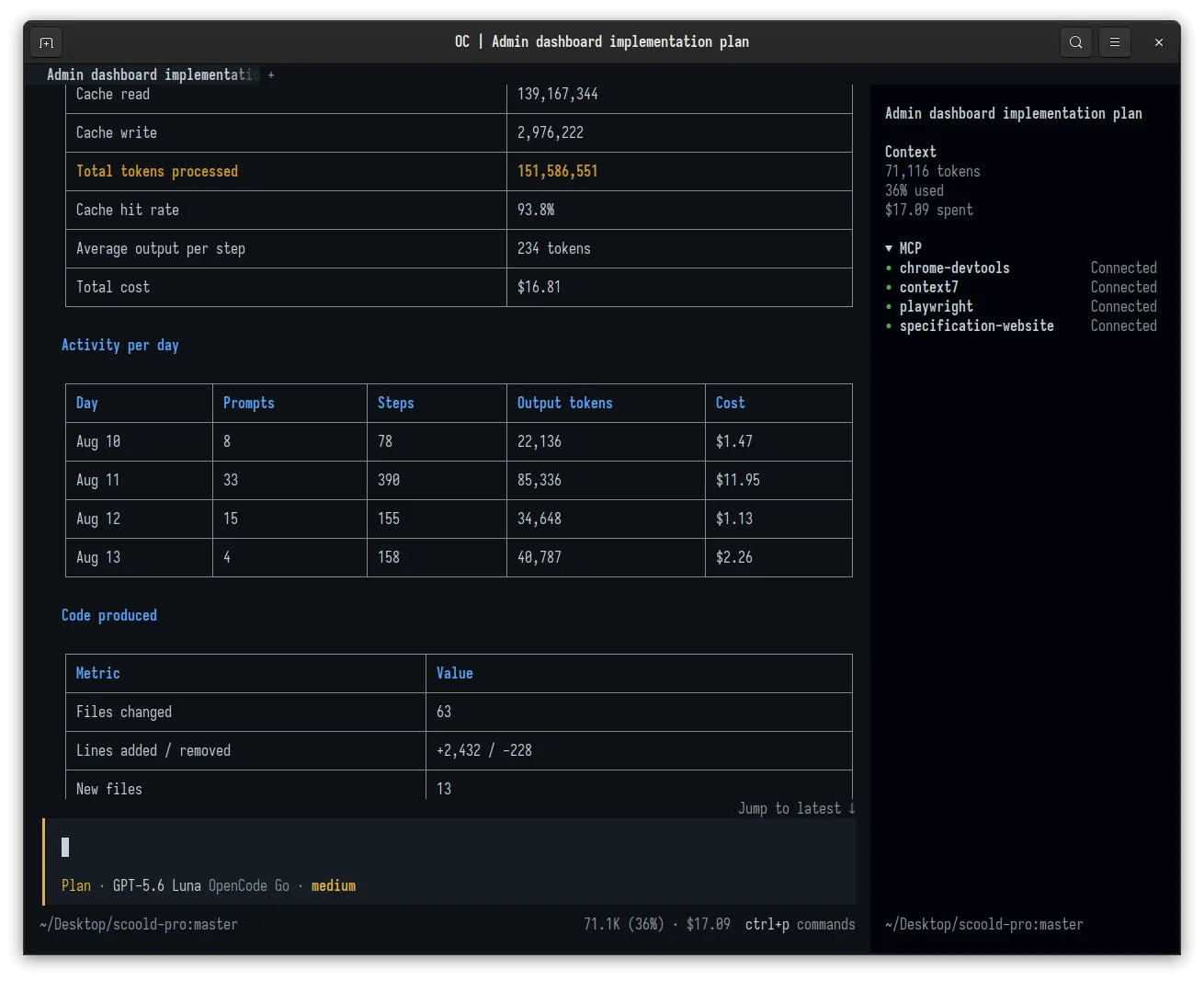
I spent four calendar days building this, and a total of ~150 million tokens, which is astounding to me. The numbers are interesting:
| Metric | Result |
|---|---|
| Calendar time | 4 days |
| Active model time | ~4.5 hours |
| Prompts | 56 |
| Model steps | 781 |
| Tool calls | 807 |
| Files changed | 63 |
| Lines added | 2,432 |
| Lines removed | 228 |
| New files | 13 |
| Feature commits | 6 |
| Total token processing | 151.6 million |
| Total AI cost | $16.81 |
It used the shell extensively, inspected the existing Java code, searched through the project, edited files, ran the Maven build and tests, started and stopped the application and used Playwright to interact with the running application in a browser.
In total, it made 153 browser calls during the session.
That last part was particularly useful. The agent could actually look at the resulting dashboard rather than relying entirely on whether the code compiled.
The models
I switched between a couple of models depending on what I needed:
- GLM-5.2 (the thinker)
- GPT-5.6 Luna (the doer)
I used GLM for the planning part. GPT Luna was used as the implementing agent and handled most of and implementation tasks.
The total cost of the entire session was only ~$17. That’s a surprisingly small amount considering the amount of code that was produced.
The session processed about 151.6 million tokens, but only 9.1 million were new input tokens. About 139.2 million tokens were served from the provider’s prompt cache, giving the session a 93.8% cache hit rate.
For long-running coding-agent sessions, this makes a significant difference to the economics. The agent repeatedly needs a large amount of context about the project, but most of that context doesn’t need to be processed from scratch every time.
One-shot vs Micro-Waterfall
One of the key takeaways from the project was that I didn’t “one-shot” the feature with instruction such as:
“Build the entire admin dashboard.”
Instead, I broke the work into smaller, verifiable pieces. I like to call it “micro waterfall”.
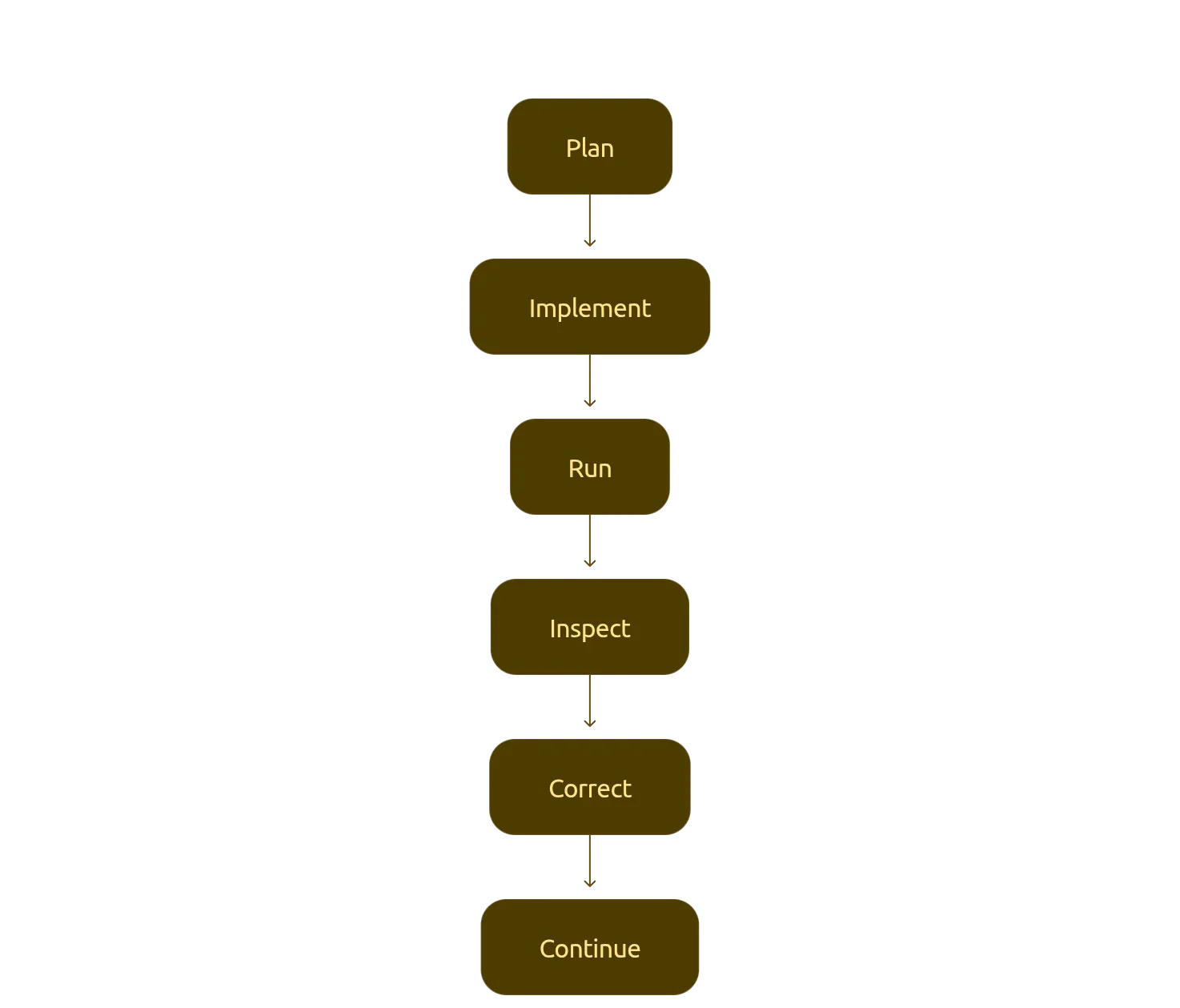
I’d ask it to implement a particular dashboard panel or part of the functionality, let it make the changes, run the application and inspect the result, and then move on to the next piece. That approach worked considerably better than trying to delegate the entire feature in one shot. The agent stayed focused because each task had a relatively clear boundary and, importantly, a clear way to verify whether the result was correct.
AI coding agents still need supervision
Early in the session, I had to explain how to start and stop the development services and provide additional information about Scoold’s backend architecture.
There were also several cases where the agent reported that something was working, but a manual check showed that it wasn’t quite right. For example, at one point a leaderboard displayed the wrong number of rows. In another case, a resource column displayed an object type instead of the actual object ID.
The agent caught a hard-to-find performance issue
One of the more interesting parts of the development was the way we handled traffic statistics. An early implementation of the dashboard would read and iterate over hundreds of objects every time the dashboard loaded. That worked, but it obviously wasn’t a good design for a production application.
During a code review, the agent identified the problem and suggested a different approach. Instead of repeatedly scanning hundreds of individual objects, Scoold now aggregates traffic information in memory and periodically flushes the aggregated data to storage. The dashboard can then read a small amount of aggregated data rather than repeatedly processing hundreds of objects.
This is a good example of where an AI coding agent can be useful beyond simply translating instructions into code. Once it understands enough of the surrounding architecture, it can also identify implementation problems and suggest improvements.
Building the activity log
The dashboard also introduced a new audit log.
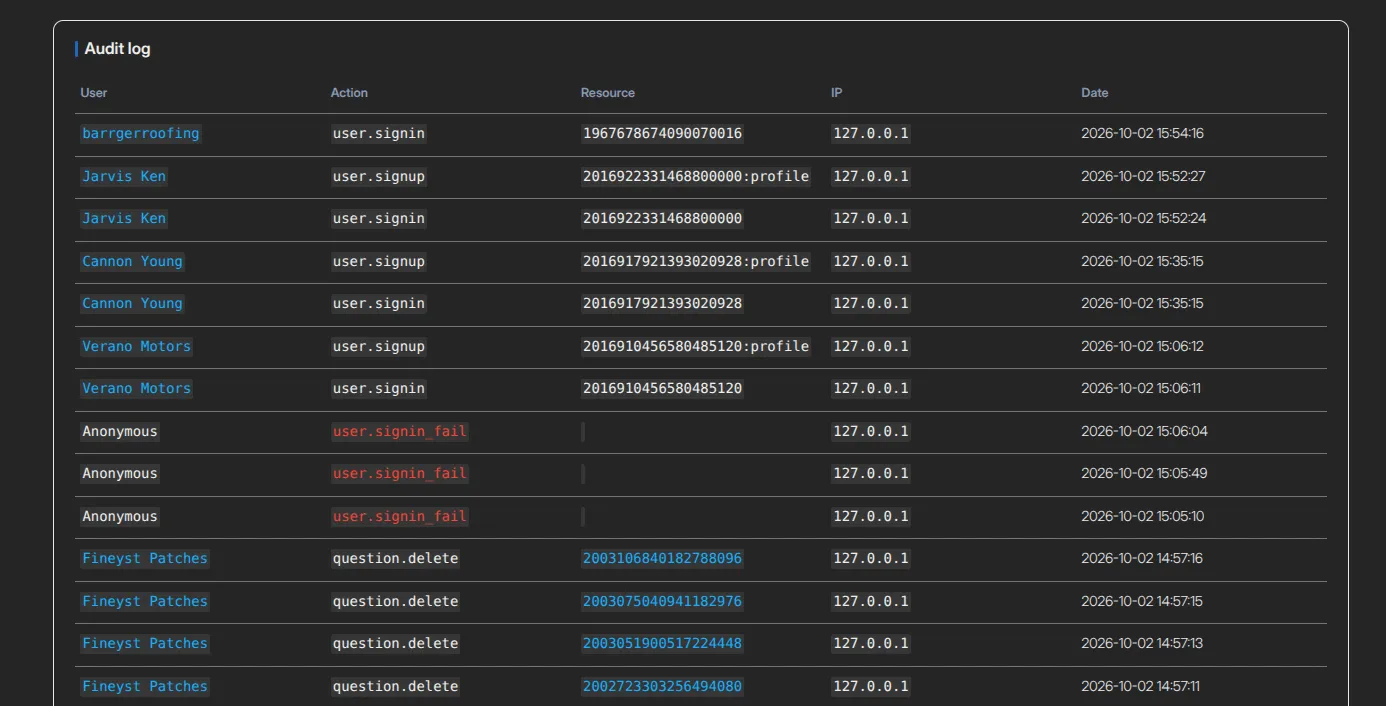
This provides administrators with an audit-style view of activity taking place in their Scoold installation. For this part of the implementation, I provided the agent with a written specification describing the events that needed to be tracked. That turned out to be a very effective way of working.
Rather than asking the agent to decide what should be logged, I gave it an explicit specification and asked it to map those requirements onto the existing controller code. The result was roughly 50 new event types and around 30 new call sites across the application. This change also greatly enhanced the webhooks API, where developers can now register to listen for much more events in Scoold.
Testing the result
The feature was validated through a combination of automated and manual testing. The project includes unit tests for the new dashboard service, while the agent also repeatedly built and ran the application during development. But browser testing was equally important.
The agent used Playwright to interact with the actual running application, while I manually inspected the dashboard and its data. This helped catch problems that wouldn’t necessarily show up in a unit test or compiler error. The final feature touches a significant portion of the application, including the admin controller, configuration, request interception, templates, JavaScript, styling, localization and the new dashboard service.
The implementation ultimately landed across 63 changed files and was split into six feature commits.
What we learned
The biggest lesson wasn’t that AI can write a lot of code. We already know that. The more interesting lesson is that the quality of the result depends heavily on the quality of the feedback loop.
The most effective workflow for this project was:
- Give the agent a clear specification.
- Let it inspect the existing codebase.
- Make the architectural decisions that require knowledge of the product.
- Break the implementation into small pieces.
- Let the agent implement each piece.
- Build and run the application.
- Inspect the result in a real browser.
- Correct problems immediately.
- Move on to the next piece.
The AI agent handled a lot of the mechanical work. I remained responsible for the product decisions, architecture and verification. Going forward, this approach will increasingly become how we develop Scoold.
What’s next?
The new dashboard gives Scoold administrators considerably more visibility into their communities, but it’s also a foundation we can build on. As we collect feedback from users, we’ll continue improving the dashboard with additional metrics and administration tools.
Scoold is designed to help companies build and maintain their own internal knowledge bases without handing their organization’s knowledge over to a third-party platform. Now administrators have better tools for understanding how that knowledge base is being used.
If you liked this post, you can try out Scoold Pro today at cloud.scoold.com.