

Para
Open SourceThe open-source backend server for busy developers
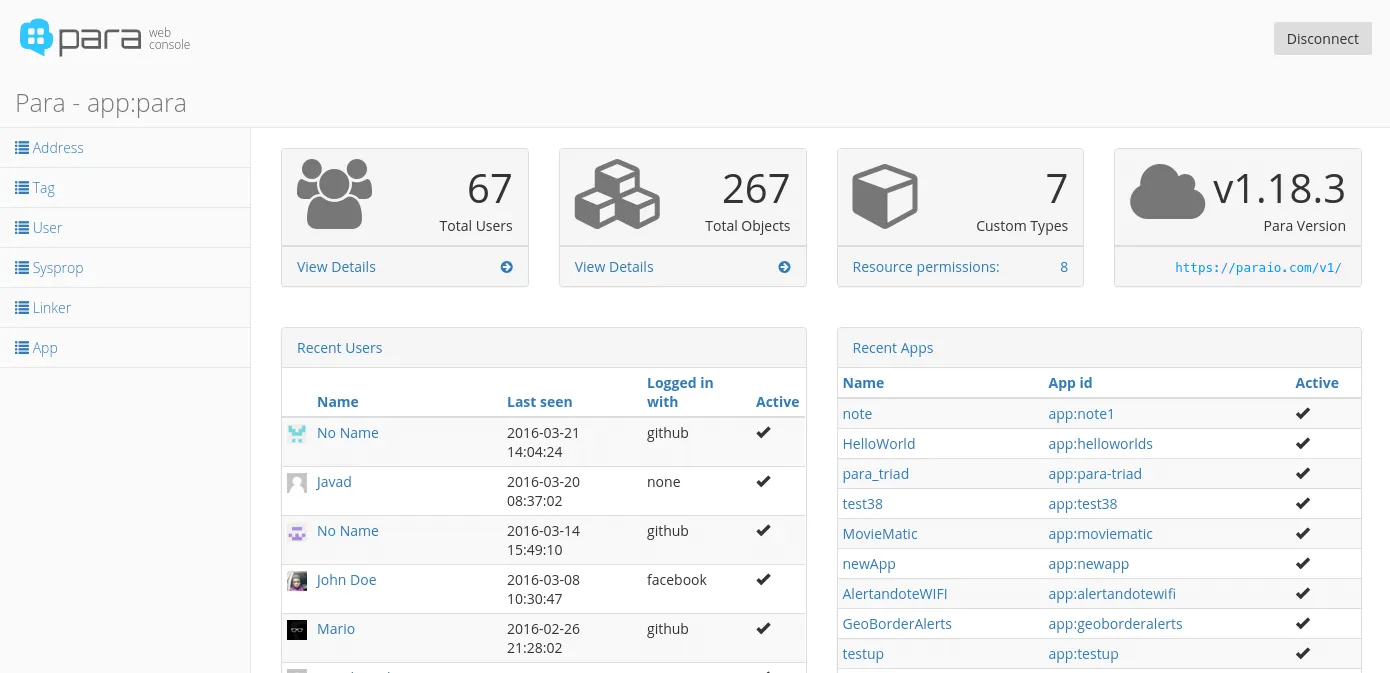
Para is a scalable, multitenant backend server/framework for object persistence and retrieval. It helps you build and prototype applications faster by taking care of backend operations. It can be a part of your JVM-based application or it can be deployed as standalone, multitenant API server with multiple applications and clients connecting to it.
The name “pára” means “steam” in Bulgarian. And just like steam is used to power stuff, you can use Para to power your mobile or web application backend.
See how Para compares to other open source backend frameworks.
Features
- RESTful JSON API secured with Amazon’s Signature V4 algorithm
- Database-agnostic, designed for scalable data stores (DynamoDB, Cassandra, MongoDB, etc.)
- Full-text search (Lucene, Elasticsearch)
- Distributed and local object cache (Hazelcast, Caffeine)
- Multitenancy - each app has its own table, index and cache
- Webhooks with signed payloads
- Flexible security based on Spring Security (LDAP, SAML, social login, CSRF protection, etc.)
- Stateless client authentication with JSON Web Tokens (JWT)
- Simple but effective resource permissions for client access control
- Robust constraint validation mechanism based on JSR-303 and Hibernate Validator
- Per-object control of persistence, index and cache operations
- Support for optimistic locking and transactions (implemented by each
DAOnatively) - Advanced serialization and deserialization capabilities (Jackson)
- Full metrics for monitoring and diagnostics (Dropwizard)
- Modular design powered by Google Guice and support for plugins
- I18n utilities for translating language packs and working with currencies
- Standalone executable JAR with embedded Jetty
- Para Web Console - admin user interface
Architecture
+----------------------------------------------------------+
|                  ____  ___ _ ____ ___ _                  |
|                 / __ \/ __` / ___/ __` /                 |
|                / /_/ / /_/ / /  / /_/ /                  |
|               / .___/\__,_/_/   \__,_/     +-------------+
|              /_/                           | Persistence |
+-------------------+  +-----------------+   +-------------+
|      REST API     |  |     Search      |---|    Cache    |
+---------+---------+--+--------+--------+---+------+------+
          |                     |                   |
+---------+---------+  +--------+--------+   +------+------+
|  Signed Requests  |  |  Search Index   |   |  Data Store |
|  and JWT Tokens   |  |      (Any)      |   |    (Any)    |
+----+---------^----+  +-----------------+   +-------------+
     |         |
+----v---------+-------------------------------------------+
| Clients: JavaScript, PHP, Java, C#, Android, iOS, et al. |
+----------------------------------------------------------+
Hosting
We offer hosting and premium support at paraio.com where you can try Para online with a free developer account. Browse and manage your users and objects, do backups and edit permissions with a few clicks in the web console. By upgrading to a premium account you will be able to scale you projects up and down in seconds and manage multiple apps.
Quick Start
- Download the latest executable JAR
- Create a configuration file
application.conffile in the same directory as the JAR package. - Start Para with
java -jar -Dconfig.file=./application.conf para-*.jar - Install Para CLI with
npm install -g para-cli - Create a new dedicated app for your project and save the access keys:
# run setup and set endpoint to either 'http://localhost:8080' or 'https://paraio.com'
# the keys for the root app are inside application.conf
$ para-cli setup
$ para-cli new-app "myapp" --name "My App"
Alternatively, you can use the Para Web Console to manage data, or integrate Para directly into your project with one of the API clients below.
Docker
Tagged Docker images for Para are located at erudikaltd/para on Docker Hub.
It’s highly recommended that you pull only release images like :1.51.0 or :latest_stable
because the :latest tag can be broken or unstable.
First, create an application.conf file and a data folder and start the Para container:
$ touch application.conf && mkdir data
$ docker run -ti -p 8080:8080 --rm -v $(pwd)/data:/para/data \
  -v $(pwd)/application.conf:/para/application.conf \
  -e JAVA_OPTS="-Dconfig.file=/para/application.conf" erudikaltd/para:latest_stable
Documentation
Read the full documentation here
Copyright Erudika Ltd.
Licensed under the Apache License, Version 2.0 (the “License”);
you may not use this file except in compliance with the License.
You may obtain a copy of the License at
https://www.apache.org/licenses/LICENSE-2.0
Unless required by applicable law or agreed to in writing, software
distributed under the License is distributed on an “AS IS” BASIS,
WITHOUT WARRANTIES OR CONDITIONS OF ANY KIND, either express or implied.
See the License for the specific language governing permissions and
limitations under the License.